Nmatic Request a demo

Queue management system

Orderly queues. Happy customers.

Nmatic runs the whole queue, from ticket to rating. Customers take a ticket at the kiosk, see their number on the hall display, hear it announced and follow the queue on their phone. You see every service in numbers.

  • In Uzbek, Russian and English
  • Runs on your local network, no internet needed
  • 12-month installation warranty
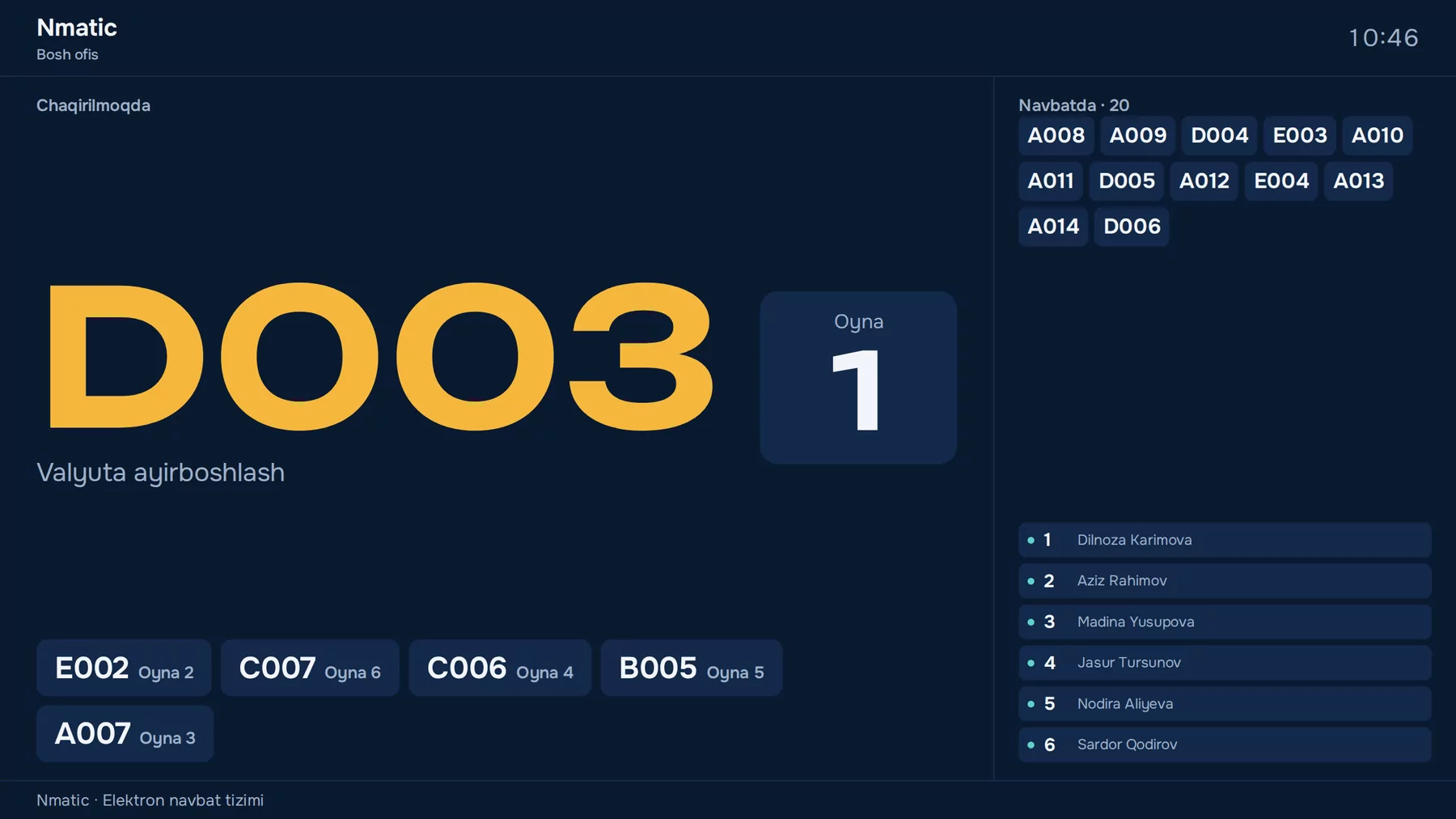
Hall display: ticket D003 is called to counter 1, with the waiting list and staff at each counter
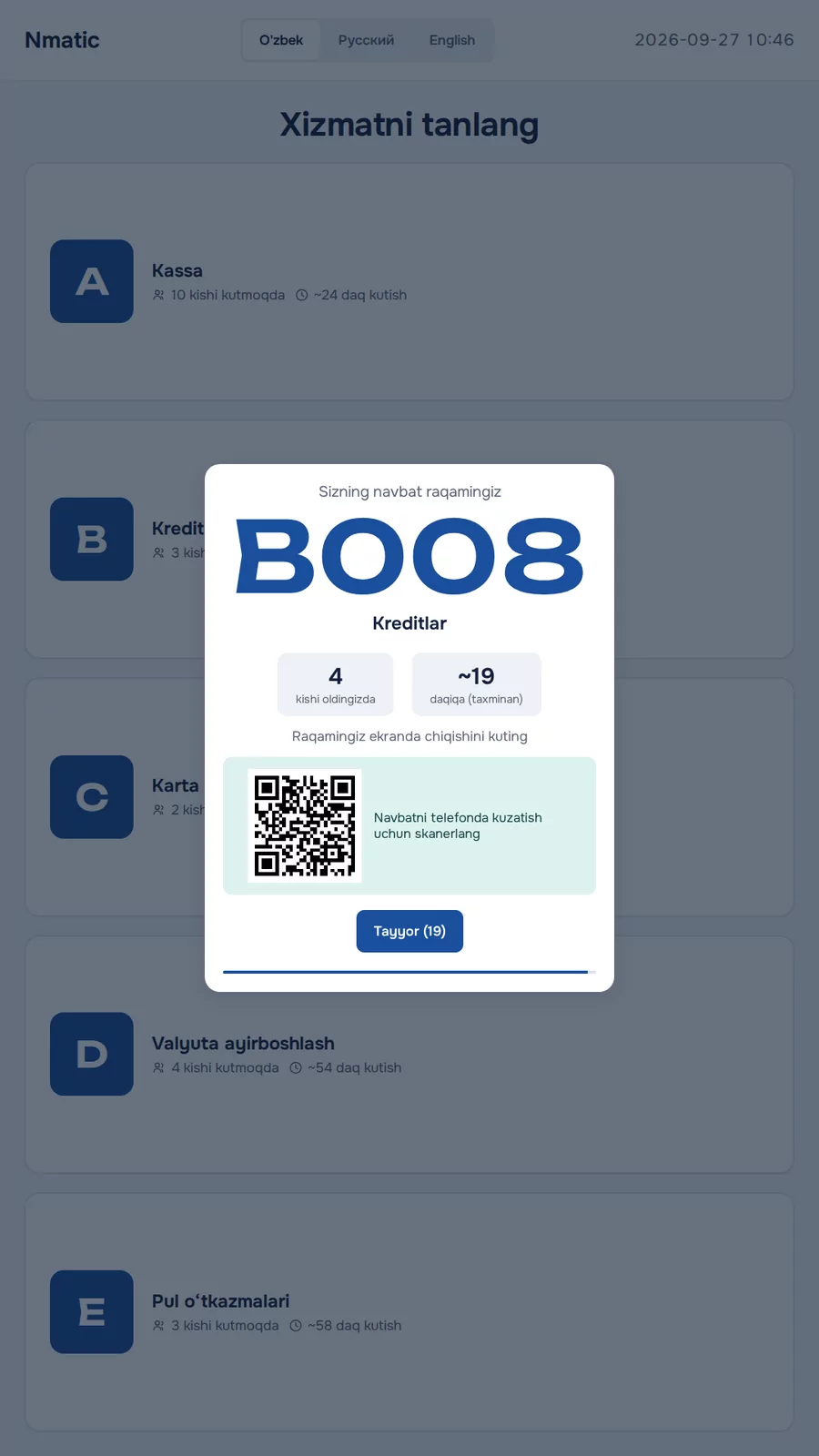
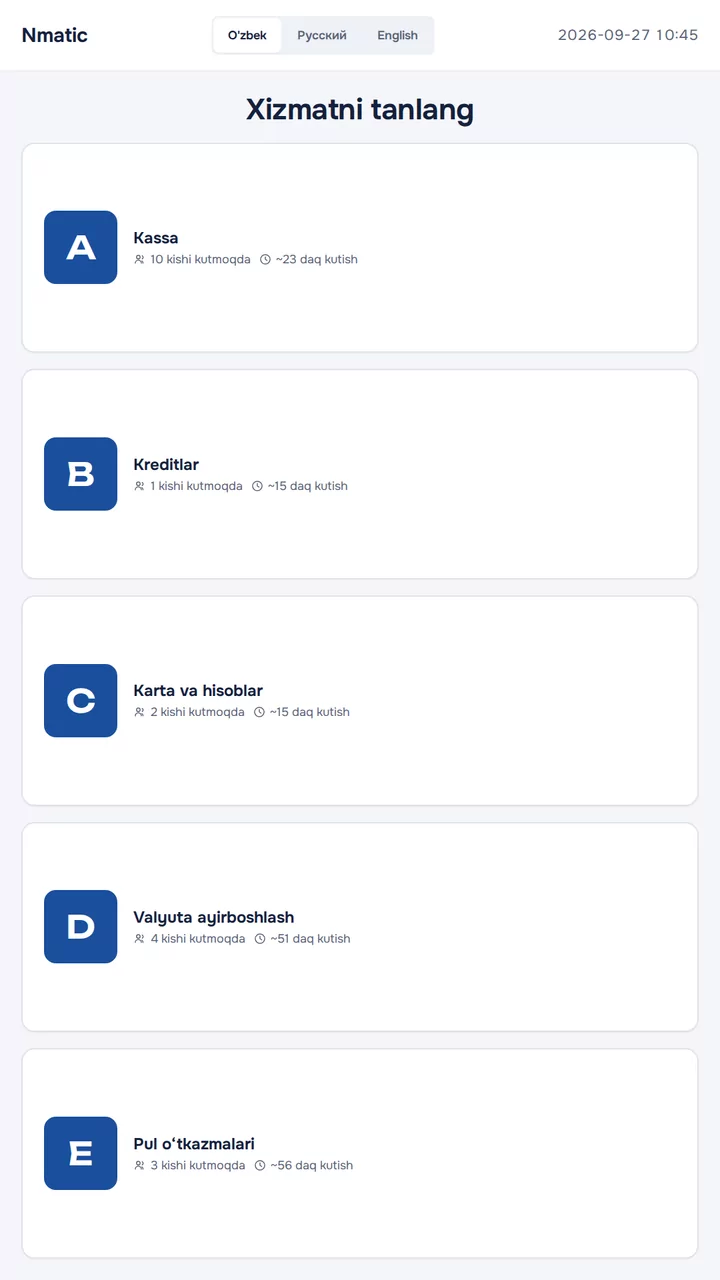
Kiosk: choosing a service, with the number of people waiting and the estimated wait for each
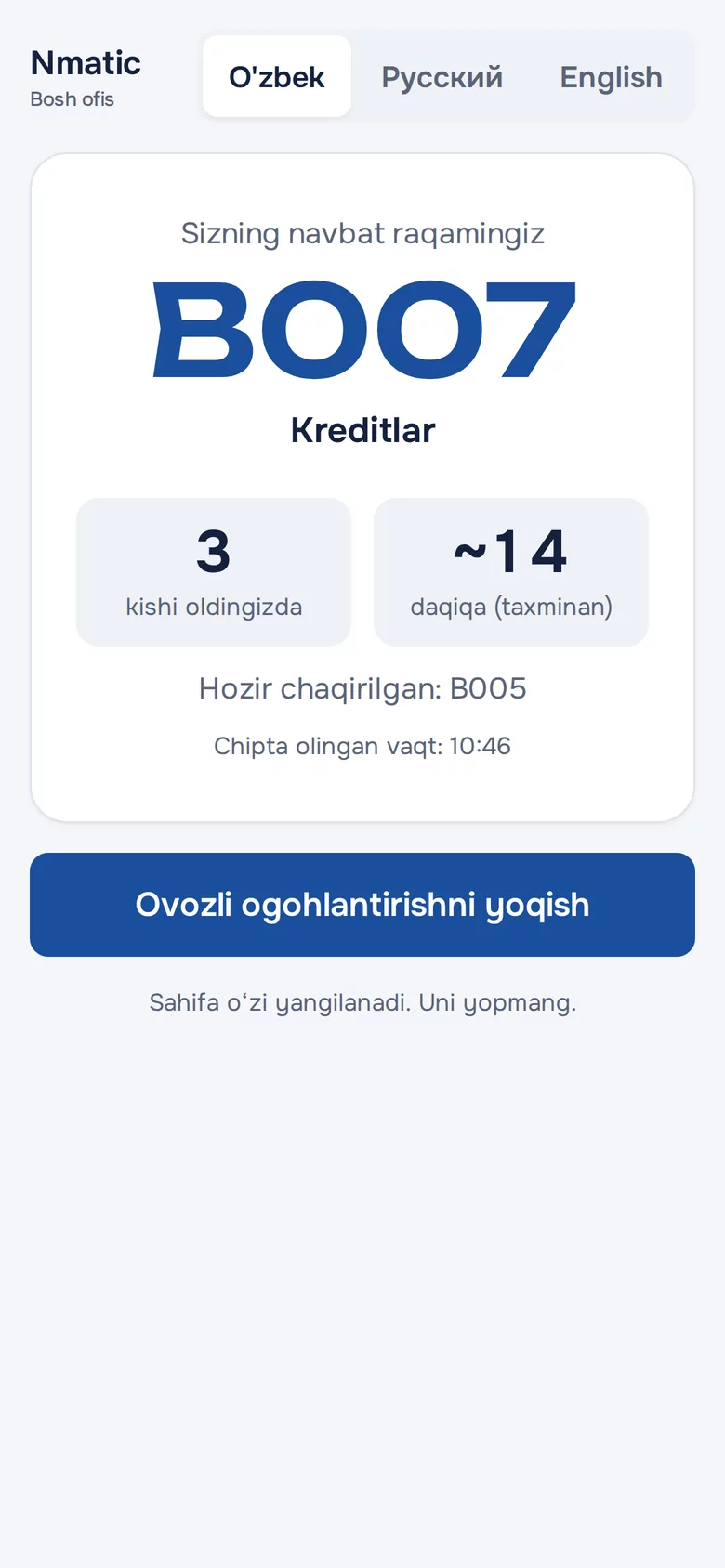
Phone: ticket B007, 3 people ahead, about 14 minutes
  • 3languages: Uzbek, Russian and English
  • 999numbers announced in a natural Uzbek voice
  • 1 secondand every screen is up to date
  • 12 monthswarranty on installation work

How it works

From ticket to rating in four steps.

Nmatic takes care of every stage of the queue: customers know what to do, staff know whom to call, and managers see everything.

  1. 01

    Take a ticket

    The customer picks a service at the kiosk and gets a numbered ticket. Its QR code opens the queue on their phone.

  2. 02

    Wait in comfort

    The number appears on the hall display. The phone shows how many people are ahead and roughly how long to wait.

  3. 03

    Get called

    The operator presses Next: the number and counter appear on screen, a voice announces the call, the phone vibrates.

  4. 04

    Rate the service

    After the visit the customer gives 1 to 5 stars. The rating goes straight into the analytics.

Kiosk

One tap. Ticket ready.

Large buttons, clear text, three languages. The kiosk shows in advance how many people are waiting for each service and roughly how long it will take. Tickets are printed on a thermal printer or shown on screen with a QR code.

  • Touch terminal, tablet or a regular monitor
  • Network and USB thermal printers, 58 and 80 mm
  • Each kiosk or branch prints to its own printer
  • Priority queue button, if you want one
Kiosk: ticket B008, 4 people ahead, QR code to follow the queue on the phone

Hall display and voice

Seen. Heard. Never missed.

The called number appears in type large enough to read across the hall, and a natural voice announces it in Uzbek. The queue, recent calls and the status of every counter fit on one screen.

Hall display: ticket D003 called to counter 1

“A o‘n besh raqamli mijoz, uchinchi oynaga marhamat”

  • Numbers up to 999, counters and rooms in a natural Uzbek voice
  • Announcements in Russian and English too
  • Any TV: Smart TV, mini PC or TV box
  • Each branch display shows only its own calls

Operator console

One button. Next customer.

Operators work from a single screen: Next, Recall, Finish, No-show, Transfer, and all of it from the keyboard too. The waiting list, how long each person has waited and the day’s results are always in view.

  • Transfer to another counter or service, keeping the number
  • Call later, and a limit on recalls
  • Breaks: the counter shows “Break” on the display
  • One operator per counter at a time
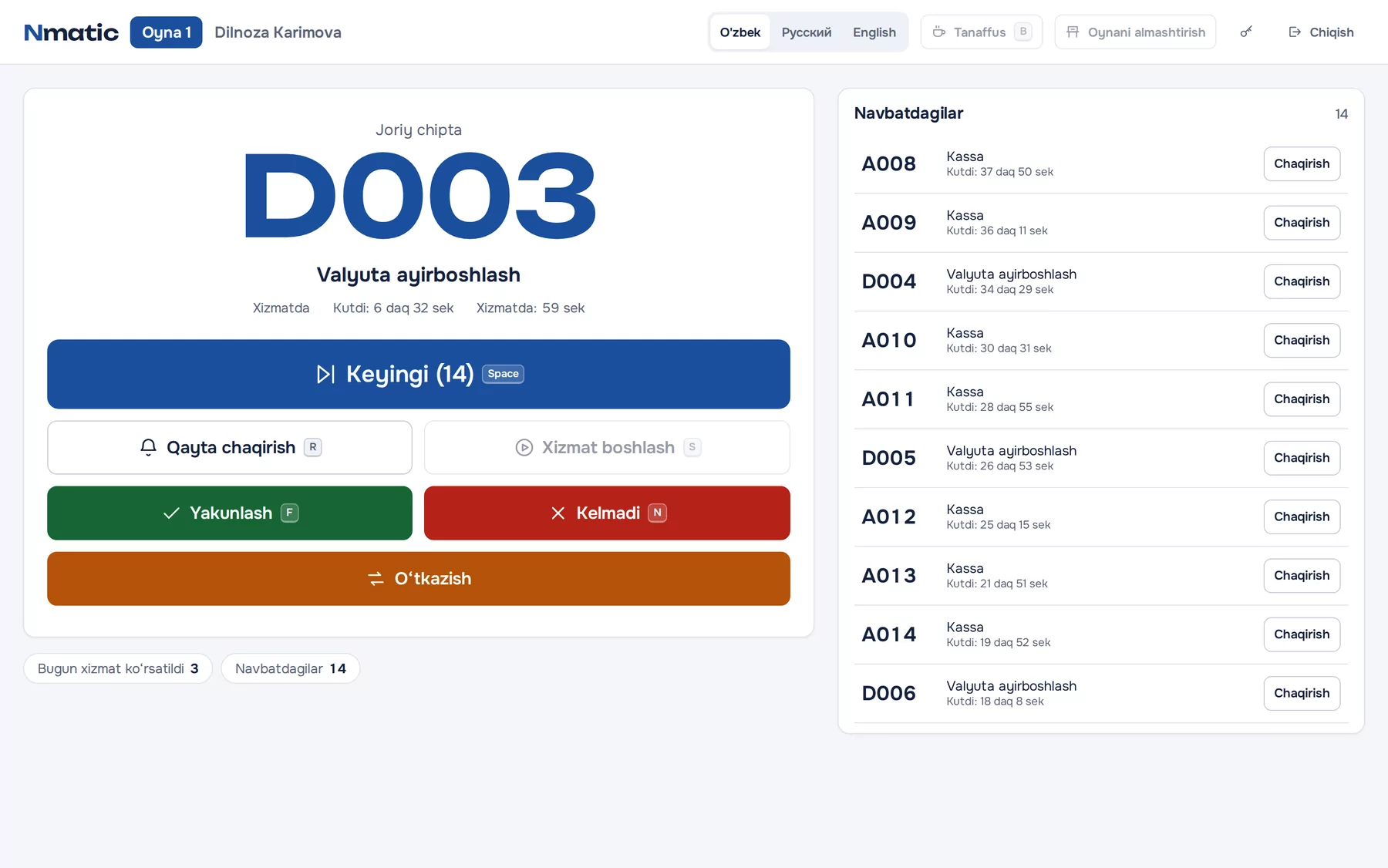
Operator console: current ticket D003 with the call buttons and the waiting list

Queue on the phone

Don’t stand in line. Follow it.

Customers who scan the QR code on their ticket follow the queue live on their phone. When their turn is near and when they are called, the phone vibrates and the Telegram bot sends a message. They can get on with their day and come back on time.

  • No app to install, just a link
  • “N people ahead of you” and an estimated time
  • Telegram: your turn is near, you are called, finished
  • Rating and comment after the visit
Phone: ticket B007, 3 people ahead, about 14 minutes
Nmatic bot

Ticket B007: your turn is coming, 1 person ahead. Please come to the counters.

Nmatic bot

Ticket B007: you are called! Please go to counter 5.

Analytics and reports

Every minute, in numbers.

Waiting and service times by service, operator, counter, hour and day. The load heatmap shows the busiest hours, so you know exactly when you need more staff. Reports export to Excel with one click.

  • Average and longest wait, 90th percentile
  • Results and breaks for every operator
  • Customer ratings and comments
  • Branch-by-branch comparison
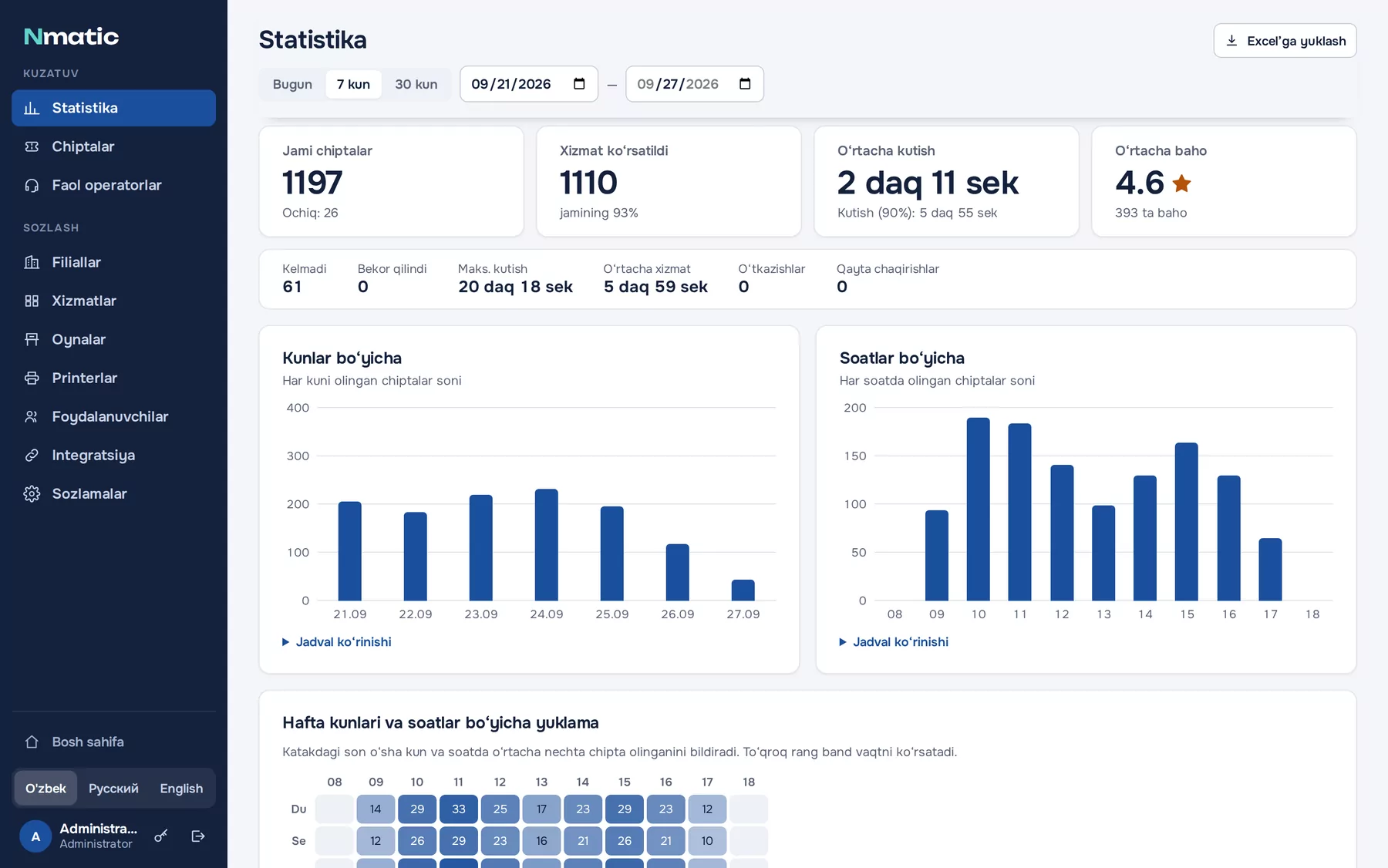
Analytics: 1,197 tickets in 7 days, average wait 2 min 11 s, average rating 4.6, charts by day and hour
Export to Excel

And there’s more

Everything a large organisation needs.

  • Branch network

    Any number of branches on one server. Staff see only their own branch; managers see and compare them all.

  • Priority queue

    For people with disabilities, veterans, pregnant women, parents with small children and the elderly. The category never appears on screen.

  • Fair order

    One rule decides who is called and when. Nobody can jump the queue.

  • Telegram bot

    Customers get a message when their turn is near, when they are called and when the service is finished.

  • SMS reminders

    Booking confirmations and appointment reminders via Eskiz.uz, daytime only.

  • API and webhooks

    Your MIS, CRM and other systems work with appointments and tickets through a REST API.

  • Printers

    Network and USB thermal printers, Cyrillic and Latin, QR codes, auto-cut.

  • Three languages

    Interface, ticket, voice and messages in the language the customer chose.

  • Daily backup

    The database is backed up automatically at 23:00 every day. Restoring takes one command.

  • Works offline

    The system runs on your internal network. If the internet goes down, the queue keeps going.

  • Security

    Administrator, operator and reception roles, a password policy, and your data on your own server.

  • Easy updates

    A new version is one command away. An offline bundle for servers without internet.

For clinics

Every patient to the right doctor. In order.

Clinic mode is switched on in the settings: screens say “patient” instead of “customer” and “room” instead of “counter”. Patients choose their doctor, the display by the door shows the room’s queue, and reception keeps it all under control.

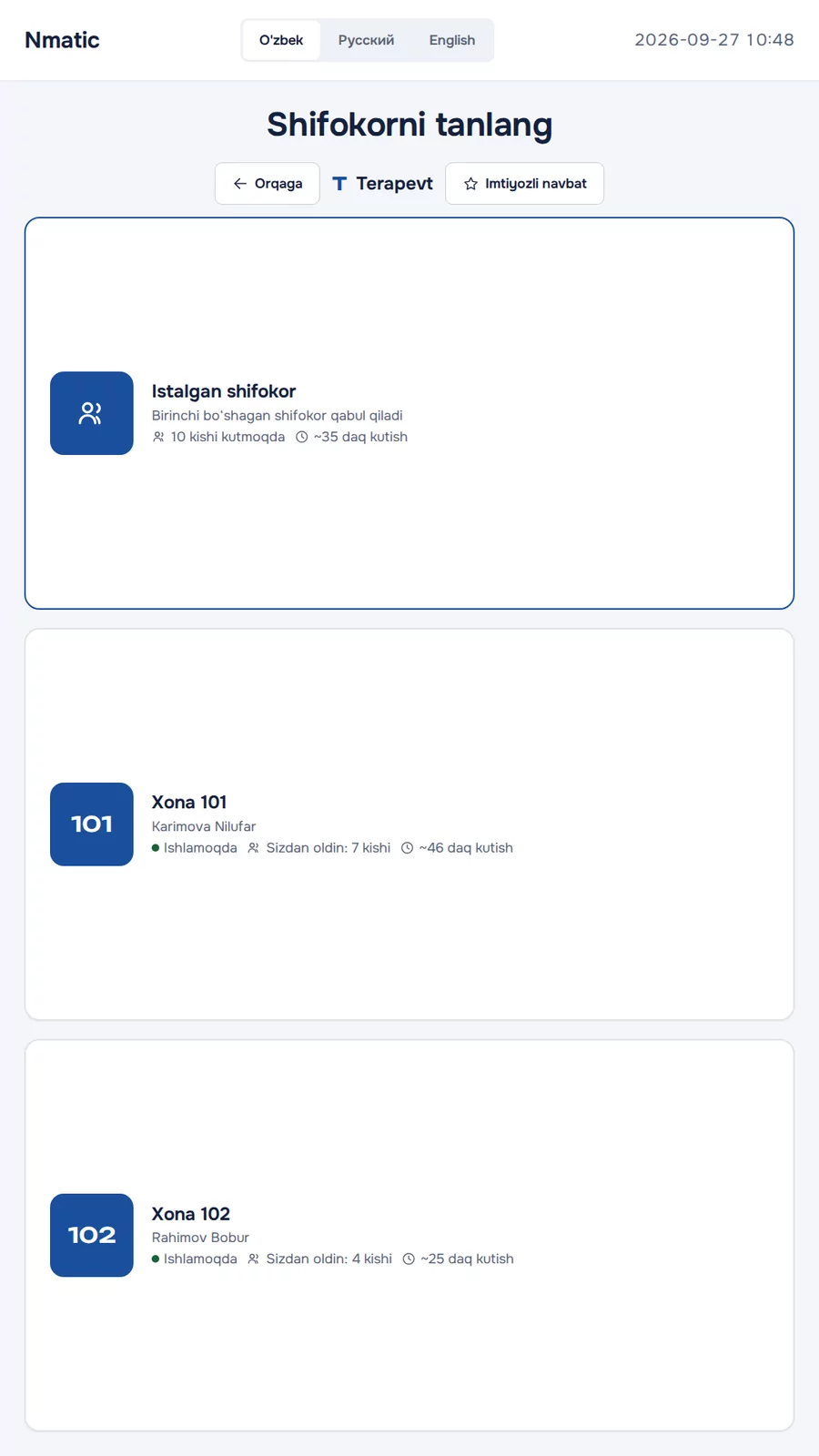
Kiosk: choosing a doctor for the therapist service, with the queue and waiting time for each room
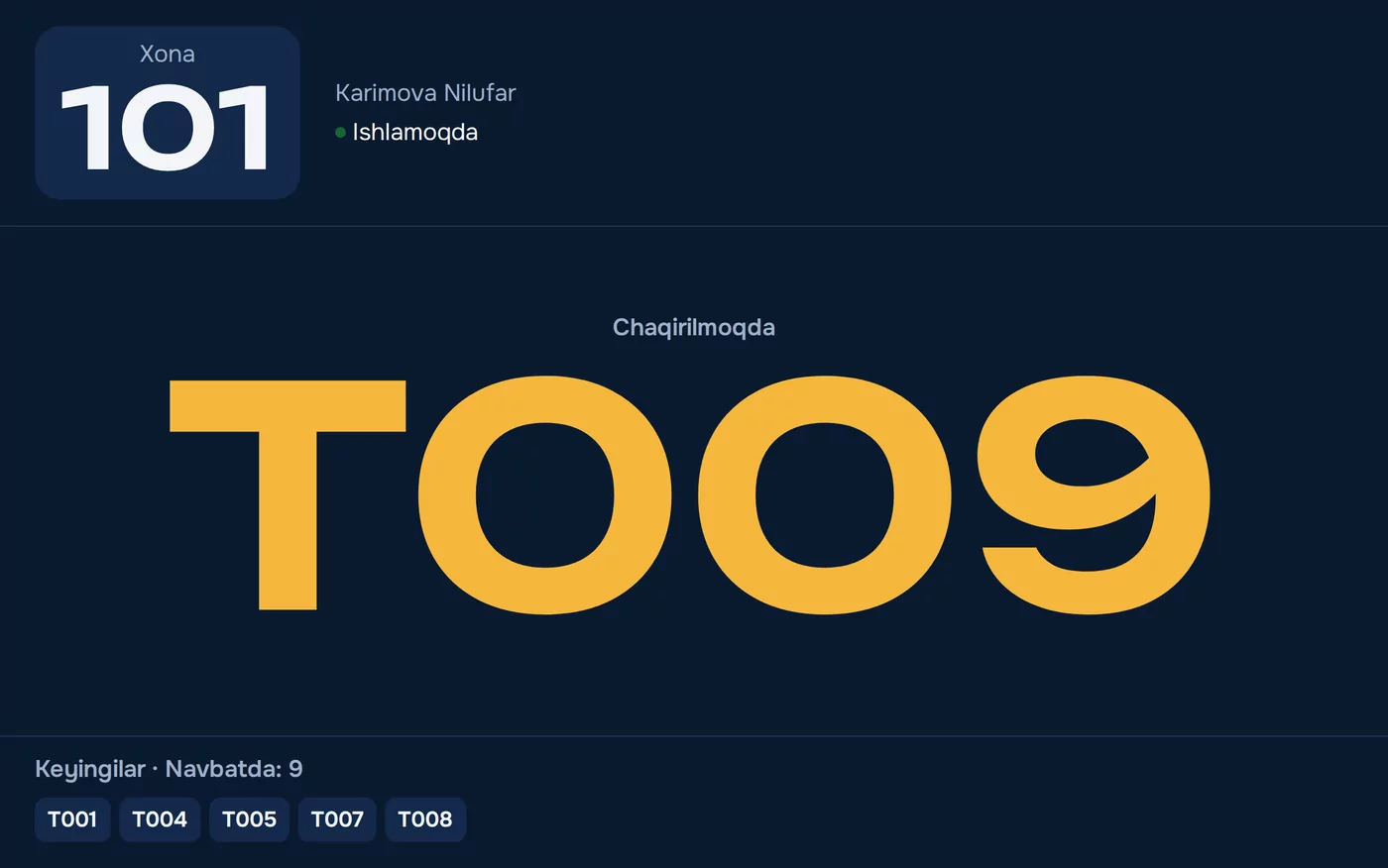
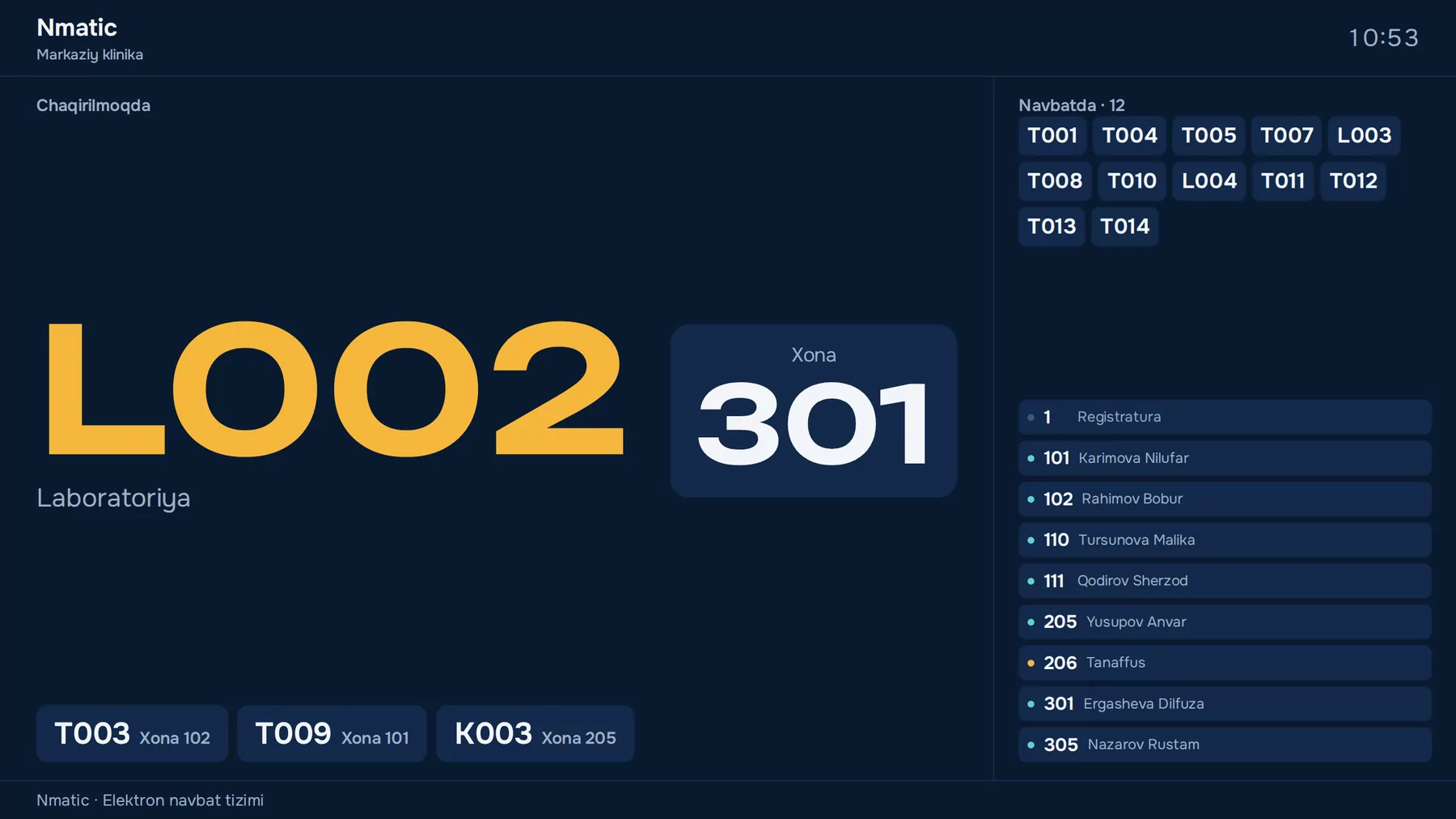
Door display: room 101, Karimova Nilufar, seeing patients, calling T009, the next numbers
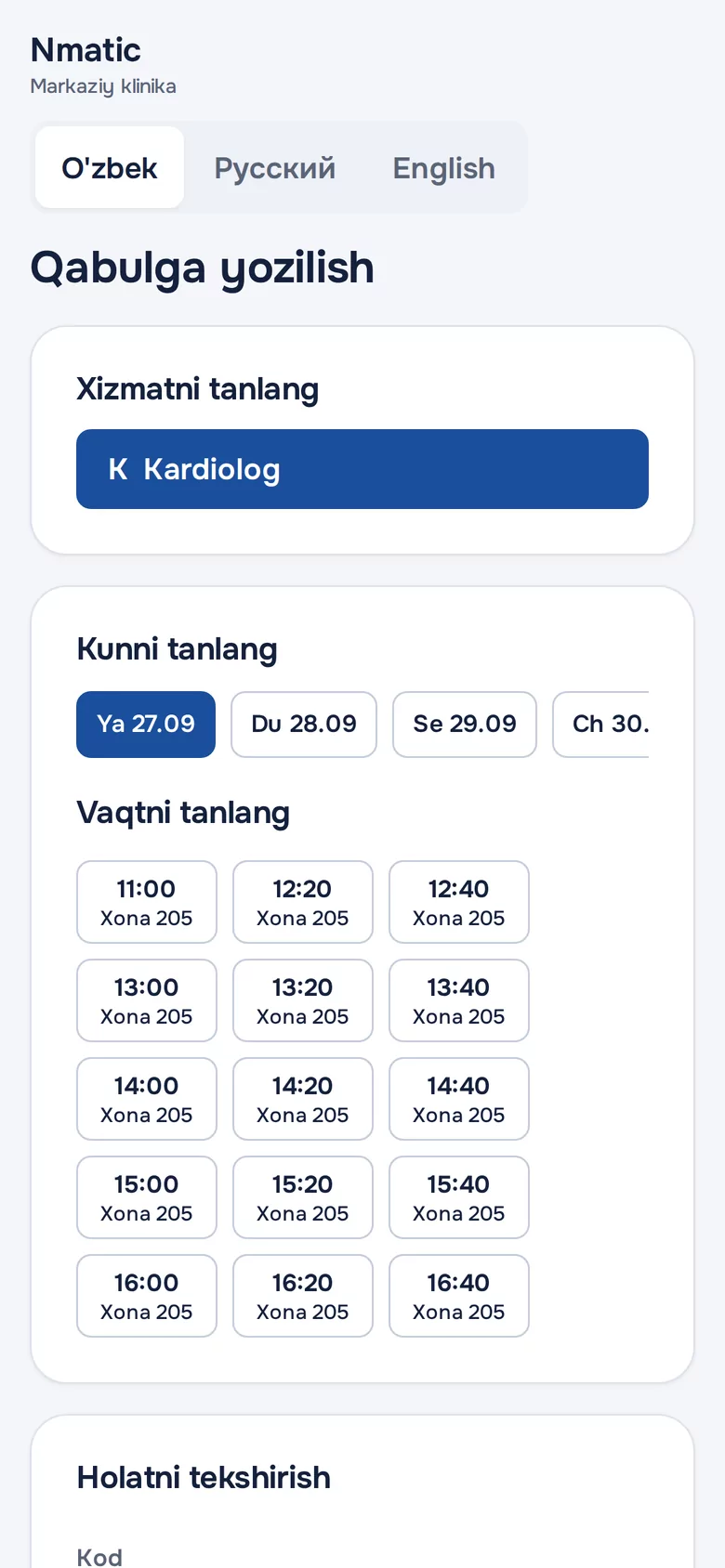
Online booking: cardiologist, choosing a day and a free slot
  • Choose a doctor

    At the kiosk, first the specialty, then the doctor: who is seeing patients, in which room and how many are waiting. Or “Any doctor”, whoever is free first.

  • Door display

    Above every door: the room number, the doctor, the status (seeing patients or on a break), the current and next numbers.

  • Reception

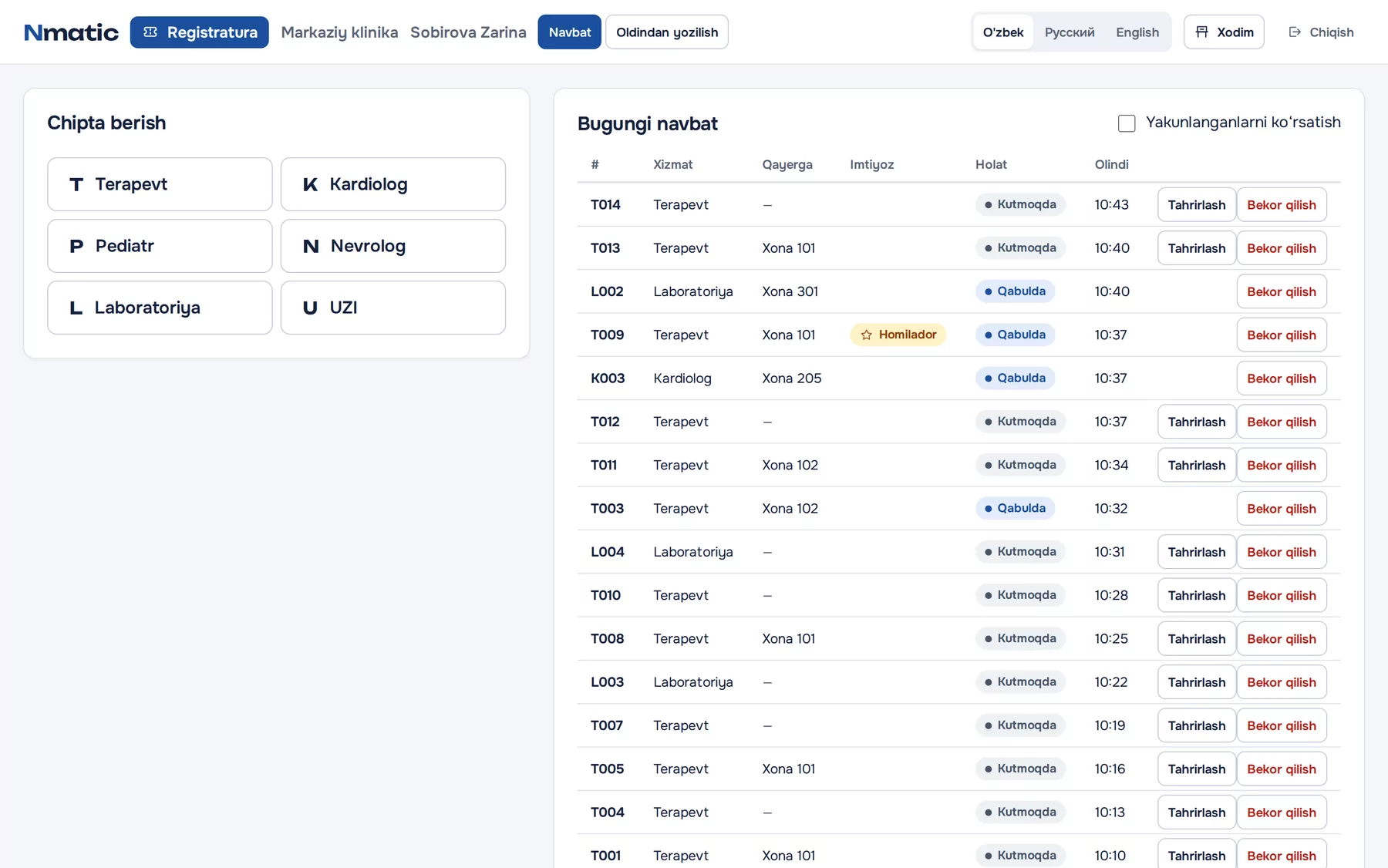
    Tickets for elderly and urgent patients, changing the category or room, cancelling, booking appointments.

  • To the lab and back

    The doctor sends the patient to the lab. After the tests the patient returns to the same doctor with the same number and goes first.

  • Appointments

    A schedule for every room. Patients enter a 6-digit code at the kiosk and are called ahead of the walk-in queue when their time comes.

  • Online booking

    Patients pick a free slot on their phone and reception confirms it. Reminders via Telegram and SMS.

  • Hours and daily limits

    Working days, hours and a daily ticket limit for each service and room. The limit holds even under simultaneous requests.

  • Patient privacy

    Screens show only numbers. Names and phone numbers are deleted automatically after a set period.

Reception: issuing tickets and today’s queue with priority categories and rooms
Clinic display: ticket L002 called to room 301

Industries

Wherever there is a queue.

Nmatic fits any organisation with a customer service hall. Services, counters and the order of calls are set up around the way you work.

  • Banks and microfinance

    Separate queues for cash, loans, cards and currency exchange. A special order for priority customers.

  • Public service centres

    Order in multi-service halls, queues for submitting and collecting documents, citizen ratings.

  • Clinics and polyclinics

    Doctor choice, door displays, laboratory, appointments and online booking.

  • Diagnostics and laboratories

    Sample collection and results, ultrasound and other examination rooms.

  • Tax, cadastre and notaries

    A fair queue for consultations and document intake, with staff workload under control.

  • Telecom operators

    Office queues for SIM cards, tariffs and technical support.

  • Utilities

    Payments, contracts and requests for gas, electricity and water.

  • Universities and colleges

    Admissions, dean’s office, accounting and records.

  • Insurance companies

    Policies, claims and consultations.

  • Car dealers and service centres

    Service reception, spare parts and the cash desk.

  • Passport and visa services

    Submitting and collecting documents in halls with many counters.

  • Post and logistics

    Sending and collecting parcels, payments.

Don’t see your industry? Leave a request and we’ll show you the system set up for your work. Request a demo

Benefits

What it does for your organisation.

  1. 01

    A calm hall

    No more “I was here first” arguments. Everyone knows their number and their place in line.

  2. 02

    Customers’ time saved

    Customers who follow the queue on their phone don’t sit in the hall: they get on with their day and come back on time.

  3. 03

    Staff performance

    How many customers each employee served, and how fast, in exact numbers.

  4. 04

    Better planning

    The load heatmap shows the busiest hours and days, so your staff are there when they are needed.

  5. 05

    Feedback every day

    A rating and comment after every visit. You see a problem before it turns into a complaint.

  6. 06

    A modern image

    A kiosk, a big display and voice announcements: your organisation looks like a major international company.

  7. 07

    Fairness and transparency

    The system sets the order, not personal connections. Priority only by the rules.

  8. 08

    Your data stays with you

    The system runs on your own server, so customer data never leaves your organisation.

Made for Uzbekistan.

A natural Uzbek voice, local SMS (Eskiz.uz) and Telegram, Uzbek, Russian and English. Installation, training and support from our team in Samarkand.

Turnkey

From software to screen, we do it all.

Nmatic is installed by the SAM Smart Security Service team, from the site survey to staff training.

  1. 1

    Site survey

    We study your hall, your services and the flow of customers. Free within Samarkand city.

  2. 2

    Design and quote

    We spell out which equipment you need, where it goes and what it costs.

  3. 3

    Equipment

    Kiosks, TVs, thermal printers, server and network: we supply them or use what you already have.

  4. 4

    Installation and setup

    Cabling, network, software, voice, services and counters, handed over ready to work.

  5. 5

    Training

    We train operators, reception staff and administrators at their workplaces.

  6. 6

    Warranty and support

    12-month warranty on installation work; the manufacturer’s warranty on equipment.

Developer

SAM Smart Security Service

Since 2018 we have delivered complete security and IT solutions for businesses: video surveillance, access control, corporate networks, servers and software. Nmatic is our team’s own product.

Visit samsmart.uz
  • In business since 2018
  • Official Dahua Technology dealer
  • 12-month installation warranty
  • VAT invoices for companies

Tech specs

A solid foundation.

Architecture
A server on your local network: PostgreSQL database, API and web app in Docker containers. Kiosks, displays and staff connect through a browser.
Server
Linux with Docker (Ubuntu, Debian), 2 GB of RAM or more. x86-64 and ARM64 processors, including Raspberry Pi.
Devices
Any device with a modern browser: touch kiosk, tablet, Smart TV or mini PC, staff computer.
Printers
58 and 80 mm thermal printers: network (ESC/POS, port 9100) or USB. Cyrillic, QR codes, auto-cut.
Languages
Interface: Uzbek, Russian, English. Voice: a recorded Uzbek voice; Russian and English through the device’s speech synthesis.
Real time
WebSocket: every call and every change shows up on every screen instantly.
Integrations
REST API with keys and permissions, webhooks signed with HMAC-SHA256, Telegram bot, SMS via Eskiz.uz.
Security
Roles and per-branch access, passwords of at least 8 characters, temporary passwords replaced at first login.
Backups and updates
Automatic daily backup (the last 30 copies kept), restore and update with one command. An offline bundle for servers without internet.
Pricing

Priced for your project.

The price of Nmatic depends on the number of branches, counters and rooms, the equipment you need and the options you choose. Leave a request and we’ll prepare a proposal for you.

Payment: cash, Uzcard and Humo cards or bank transfer. VAT invoices for companies.

Get a proposal

What the proposal covers

  • Software licence
  • List and cost of the equipment you need
  • Installation and setup
  • Staff training
  • Warranty and maintenance terms

What affects the price

  • Number of branches
  • Number of counters and rooms
  • Equipment: new or existing
  • Options: SMS, integrations, online booking

FAQ

Frequently asked questions.

Does it need the internet?

No. Nmatic runs on your organisation’s local network. The internet is only needed for Telegram messages, SMS and online booking. If it goes down, the queue keeps working.

Can we use our existing TVs and computers?

Yes. A TV with a browser, or a mini PC connected to it, works as the display, and a regular computer is enough for an operator. We can also supply the equipment.

How long does installation take?

The software itself installs in a few minutes. Mounting and setting up the equipment depends on the site; we’ll give you an exact timeline after the survey.

How many branches and counters are supported?

There is no limit: several branches on one server, each with as many services and counters as you need.

Where is the data stored?

On your server. Customer and patient data never leaves your organisation, and the backups stay with you too.

Which languages are the announcements in?

Uzbek, in a recorded natural voice: numbers up to 999, counters and rooms. Russian and English use the device’s speech synthesis.

How are tickets printed?

On a 58 or 80 mm thermal printer, either on the network or connected to the kiosk by USB. It also works without a printer: the number is shown on screen and on the phone.

Can it connect to our other systems?

Yes. Through the REST API and webhooks, your MIS, CRM and other systems work with appointments and tickets.

Is there a warranty and support?

Installation work comes with a 12-month warranty, and equipment is covered by the manufacturer’s warranty. If you have a question, reach us by phone or Telegram.

Can we see it in action?

Yes. Leave a request and we’ll show you live how the kiosk, the hall display and the operator console work.

Request

Demo and price proposal.

Tell us briefly about your organisation. Our specialist will contact you to arrange a demo and prepare a proposal.

What do you need?